Celine Genta: A Premium Script Font for Web Design
I was staring at a blank hero section for a boutique coaching website, trying to find the right balance between professional authority and approachable warmth. The client wanted something that felt human, not corporate, but I needed it to load fast and read clearly on mobile devices. That’s when I pulled Celine Genta into my design system. As a web designer who constantly sifts through new Fonts, finding a script typeface that actually works in a responsive layout is rare. Celine Genta immediately stood out as a premium font that bridges the gap between elegant editorial design and modern digital usability.
Bringing Elegance to Hero Sections and Headlines
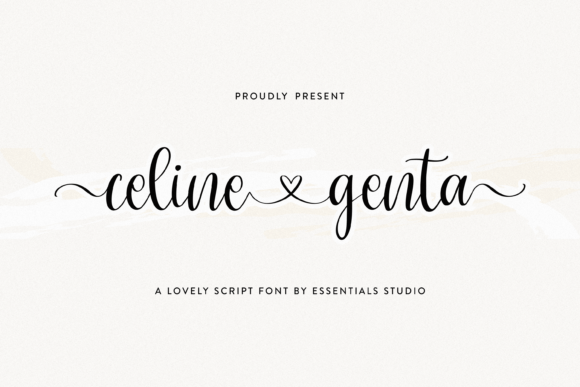
The first thing I noticed when testing Celine Genta in a large headline was its exquisite swash details. In the world of web design, decorative elements can often get lost or look messy on high-resolution screens, but this script font holds its shape beautifully. I placed the word "Welcome" over a soft, textured background image, and the ligatures connected seamlessly, creating a fluid motion that drew the eye down the page. It felt less like a standard display font and more like a custom hand-lettered logo.
For landing pages where the goal is immediate emotional connection, Celine Genta performs exceptionally well. Whether it’s a wedding planning service, a luxury skincare brand, or a creative portfolio, the personality of this typeface sets the tone instantly. It signals quality without shouting. I found that using it for the main H1 tag gave the site a sophisticated edge, while the clean lines ensured it didn’t feel cluttered. This is exactly what you want from a creative font intended for branding projects; it elevates the entire visual hierarchy.
Navigating Readability and Responsive Layouts
One of the biggest challenges with any handwritten font in digital spaces is readability across different screen sizes. During my review, I tested Celine Genta on mobile viewports, tablet layouts, and desktop monitors. On larger screens, the swashes are stunning, adding a touch of flair to section headers. However, when scaling down to mobile, I had to be strategic. While the core characters remain legible at reasonable sizes (around 32px or larger), the intricate tails can sometimes compete with other UI elements if the line height isn't adjusted properly.
This font is not designed for body copy. Attempting to use Celine Genta for paragraphs of text would ruin the user experience and hurt accessibility. Instead, I treated it strictly as a display element for titles, subheadings, and short phrases. For the actual content, I paired it with a clean sans serif font. This combination creates a perfect contrast: the script adds the emotion and style, while the sans-serif ensures the information is consumed quickly and easily. This font pairing strategy is essential for maintaining good UX while still delivering a unique brand identity.
Enhancing Brand Identity with Ligatures and Swashes
What truly sets Celine Genta apart within the Script Amp category is the attention to detail in its alternates and ligatures. In a digital environment, these features allow designers to create dynamic logos and call-to-action buttons that stand out. I experimented with the swashes on a button label for a course sales page. By activating specific alternate characters, the button transformed from a simple rectangle into an inviting invitation to click.
These details are crucial for building a cohesive brand identity. When I applied Celine Genta to social media graphics derived from the website assets, the consistency was seamless. The same elegant curves appeared on Instagram story templates, email headers, and the website navigation accents. This versatility makes it a powerful asset for digital product creators who need a single typeface to carry their visual language across multiple platforms. It feels like a commercial font built for brands that care about the finer points of their presentation.
Strategic Pairing for Modern Typography
To make Celine Genta work effectively in a full website layout, pairing is everything. In my project, I chose a geometric sans serif font for the body text to provide a neutral backdrop that let the script shine. The lack of serifs in the body copy prevented visual competition, allowing the swashes of Celine Genta to act as the primary focal point. If you are aiming for a more editorial or magazine-style look, you might consider pairing it with a classic serif font, which would enhance the traditional elegance of the script.
However, avoid pairing it with another heavy script or overly decorative font. The result would be visual noise that confuses the user. The beauty of Celine Genta lies in its ability to lead. It should be the star of the show, used sparingly for impact. Whether you are designing a blog header, a welcome message, or a testimonial quote, keeping the supporting typography simple ensures that your modern typography choices communicate clarity rather than chaos.
Licensing and Technical Considerations for Digital Use
Before integrating Celine Genta into any live website or client project, it is vital to verify the licensing terms. As a commercial font, it offers flexibility for business use, but you must ensure your license covers web usage, specifically looking for webfont files (WOFF, WOFF2) or access to a CDN if provided. Always check for multilingual support if your audience is global, as script fonts can sometimes have limited character sets compared to standard typefaces.
Also, consider the file size. High-detail scripts can sometimes weigh more than basic fonts, potentially affecting page load speeds. Optimizing the font files is a best practice to maintain performance scores. Despite these technical checks, the payoff is worth it. Celine Genta brings a level of polish and personal touch that generic Google Fonts often lack. It transforms a standard webpage into a curated digital experience.
Final Impressions for the Digital Creator
After spending time with Celine Genta in real-world scenarios, from hero banners to digital invitations, it has earned a permanent spot in my design toolkit. It is a premium font that understands the nuances of both aesthetics and functionality. It doesn’t just look pretty; it communicates a specific mood—sophisticated, welcoming, and refined. For web designers, UI specialists, and online entrepreneurs looking to elevate their digital presence, this script font offers a compelling solution.
If you are tired of the same old standard typefaces and want to inject some genuine character into your next project, Celine Genta is worth exploring. Just remember to use it where it shines: in headlines, logos, and key visual moments. When paired correctly and deployed with intention, it becomes more than just text; it becomes a signature element of your brand’s digital story.